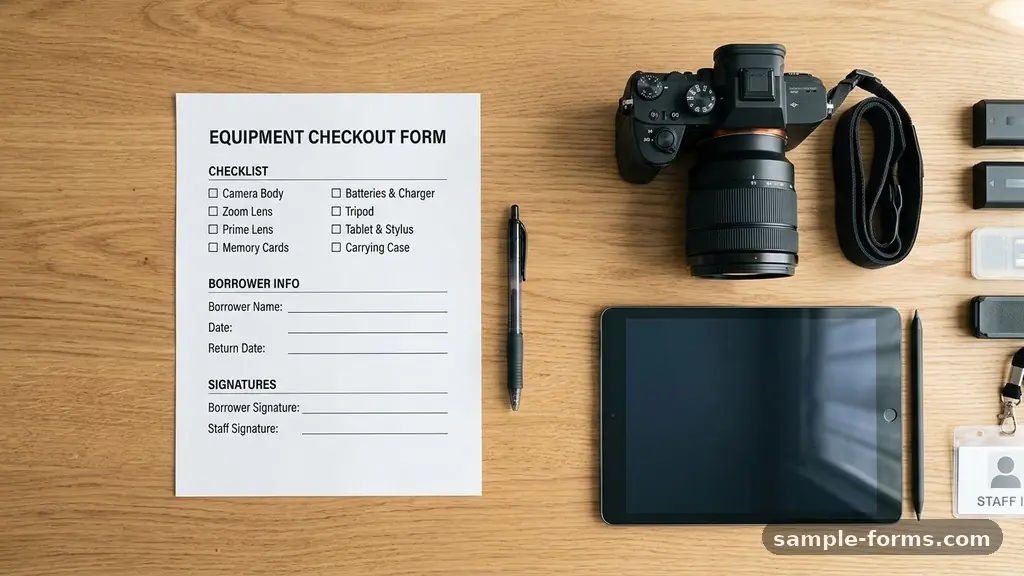
Managing physical assets effectively relies on a reliable equipment checkout form to bridge the gap between storage and active use. Whether you are running a small photography studio, a construction company, or an academic lab, knowing exactly who has which piece of gear is essential for operational stability.
By implementing a clear system, you reduce the risk of misplaced items and ensure accountability among your team members. This guide explores the core components, legal considerations, and best practices for building a process that saves you time and protects your valuable hardware investments.
Why You Need a Standardized Process
The primary purpose of an equipment checkout form is to establish a clear chain of custody. Without a formal document, items often vanish into the “gray area” where nobody claims responsibility for their location or condition.
When you require a signature for every asset transfer, you create a psychological and practical boundary that discourages negligence. This simple administrative step acts as a deterrent against loss and helps you maintain an accurate view of your total inventory.
A consistent workflow also simplifies your resource allocation. If you know exactly when a specific camera, drill, or laptop is due back, you can schedule projects with much higher precision. You will spend less time hunting for gear and more time executing your actual work.
Furthermore, tracking usage patterns allows you to identify which items are in high demand and which ones are gathering dust. This data-driven approach to asset management prevents over-purchasing and helps you retire aging hardware before it causes a major failure on the job.
Essential Data Points for Your Template
To make your form truly effective, you must collect specific information every single time an item leaves your facility. Start with the basics: the user’s full name, department, and contact information.
You should also include a unique identifier for the equipment, such as the serial number, to ensure there is no confusion between two identical models. Recording the exact date and time of the checkout is mandatory for enforcing your hardware return policy.
Beyond identification, you need a section for the physical state of the item at the time of departure. An equipment condition report allows the user to note any existing scratches, dents, or technical quirks before they take possession. This protects both the organization and the user from disputes regarding damage that may have occurred previously.
Finally, include a clear deadline for the return. Having a specific “due date and time” field removes ambiguity and gives you a concrete basis for follow-up if an item is not returned as promised.
The Role of Liability and Legal Protection
Incorporating a liability waiver into your checkout document is a critical step for risk mitigation. This section should clearly state that the user accepts responsibility for the item while it is under their care.
By signing, the user acknowledges that they are liable for any repair or replacement costs resulting from negligence or unauthorized use. While you hope it never comes to this, having a signed agreement is vital if you need to recoup costs for lost and damaged items.
You might also consider adding a section regarding the intended use of the equipment. If certain tools require specific safety certifications or training, your form should include a checkbox confirming the user has the necessary qualifications.
This protects your organization from liability in the event of an accident caused by improper operation. Always keep these documents filed securely, as they represent legal evidence of the custody transfer between your organization and the individual employee or contractor.
Comparing Manual and Digital Systems
Deciding between paper-based forms and digital solutions depends on the size of your operation and your budget. While paper is inexpensive and requires no technical setup, it is notoriously difficult to search or audit.
Digital systems, conversely, provide real-time updates and automated alerts that can significantly streamline your operations. Below is a comparison of these two approaches to help you decide which fits your current needs.
| Feature | Paper-Based System | Digital/Software System |
|---|---|---|
| Setup Cost | Low (Printing only) | Moderate to High |
| Searchability | Manual/Slow | Instant/Automated |
| Notifications | None | Automatic Email/SMS |
| Data Security | Physical cabinet risk | Encrypted Cloud Storage |
Digital platforms often integrate with existing inventory tracking software, which can pull serial numbers directly from your database. This eliminates manual entry errors and ensures your records remain perfectly synced.
If you choose a digital route, ensure your provider supports a digital signature feature to maintain the legal validity of the agreement. Many organizations find that the time saved by moving away from paper binders justifies the monthly subscription cost of a software-based asset manager.
Managing the Check-in Procedure
The check-in procedure is arguably more important than the checkout phase. This is your final opportunity to inspect the item before it returns to your inventory or is passed on to the next user.
When an item comes back, verify that all accessories—such as cables, batteries, or cases—are accounted for. If a piece is missing, document it immediately while the user is still present to explain the situation.
It is helpful to have a checklist for this return process. This prevents your staff from rushing through the inspection and missing minor issues like a frayed cord or a loose battery latch.
If the item requires cleaning or calibration, mark it as “in maintenance” immediately rather than placing it back on the shelf. Keeping rigorous maintenance logs attached to each serialized inventory item ensures that you have a complete history of the equipment’s lifecycle, which is invaluable for warranty claims and future purchasing decisions.
Best Practices for Asset Tracking
Successful inventory management is not just about the form; it is about the culture of accountability you build within your team. Ensure that every item is clearly labeled with a barcode or a QR code that links directly to its profile.
When a user scans the code, the system should automatically pull up the equipment checkout form, saving them from having to write out long serial numbers by hand. Consistency is your greatest ally here; the moment you allow “off-the-books” borrows, the entire system begins to lose its integrity.
* Perform regular audits: Conduct a physical count of all high-value gear at least once per quarter to catch discrepancies.
* Standardize naming conventions: Use consistent labels for all items to avoid confusion in your digital database.
* Automate reminders: Use email alerts to notify users 24 hours before their equipment is due for return.
* Centralize storage: Keep all equipment in a single, secure room with restricted access to minimize unauthorized movement.
* Update policies annually: Review your checkout procedures every year to ensure they align with current hardware needs and legal requirements.
You can find additional guidance on managing institutional resources through the National Institute of Standards and Technology property management guidelines, which provide a high-level view of how large organizations maintain accountability for their physical assets. While your operation may be smaller, the principles of tracking, maintenance, and responsibility remain identical.
Handling Lost or Damaged Items
Inevitably, an item will be returned broken or go missing entirely. Your equipment checkout form should clearly outline the steps for reporting these incidents.
Require the user to fill out a brief incident report explaining what happened, where it happened, and why the damage occurred. This documentation is crucial for insurance claims and for determining whether the user needs additional training or if the equipment simply reached the end of its functional life.
Do not be afraid to enforce your policy if negligence is clearly involved. If an employee or contractor understands that there are consequences for losing expensive gear, they will naturally be more careful.
However, differentiate between accidental wear and tear and avoidable damage. A piece of equipment that fails after years of service is a business expense; a laptop dropped in a pool is a liability issue that needs to be handled according to your pre-established agreement.
Common Mistakes to Avoid
One of the most frequent errors is creating a form that is too long. If your document requires ten minutes to fill out, your team will find ways to bypass the system. Keep your form concise, focusing only on the data points that you actually use to make decisions.
Another mistake is failing to update your inventory list when new gear is purchased or old gear is sold. An outdated list makes your tracking system useless because you are essentially guessing what is available.
Avoid the temptation to rely on memory for small items. Even inexpensive tools like pliers or extension cords should be tracked if they are frequently used across different sites. When people know that even the smallest items are being tracked, they develop a habit of responsibility that carries over to your more expensive hardware.
Finally, never keep your forms in a location where they can be easily altered or discarded. A locked cabinet or a secure cloud server is the only place for these records.
Frequently Asked Questions
Should I require a separate form for every item?
It is much more efficient to use a single form that allows for multiple items to be checked out at once. Just ensure that each item has its own line for a serial number and a specific return status, so you can track them individually.
What if the user is a contractor and not an employee?
The process remains the same, but you should ensure your liability waiver is specifically reviewed by legal counsel to cover non-employees. It is often wise to require a security deposit or a credit card authorization for contractors to further incentivize the safe return of your gear.
How long should I keep old checkout forms?
You should retain these documents for at least the duration of the item’s warranty period or, at a minimum, for three to five years for tax and audit purposes. Digital storage makes this easy, as you can archive them in folders by year without taking up physical office space.
What is the most effective way to label gear?
Durable, tamper-evident labels or laser-etched serial numbers are the gold standard. Avoid simple stickers, as they peel off easily in high-use environments like construction sites or event production.
Can I use a spreadsheet for this?
A spreadsheet can work for very small teams, but it becomes fragile as you scale. If more than one person needs to update the status of an item at the same time, you will inevitably run into version control issues that lead to data loss.
Summary and Next Steps
Building a reliable equipment checkout form is one of the most effective ways to professionalize your operations and protect your assets. By focusing on clear identification, signed liability waivers, and a consistent return procedure, you create a culture of accountability that saves time and money. Start by auditing your current inventory and digitizing your records to ensure that every piece of hardware is accounted for.
As your organization grows, continue to refine your process and use the data you collect to make smarter purchasing decisions. Implementing this structure today provides the peace of mind that your equipment is safe, tracked, and ready whenever you need it most.