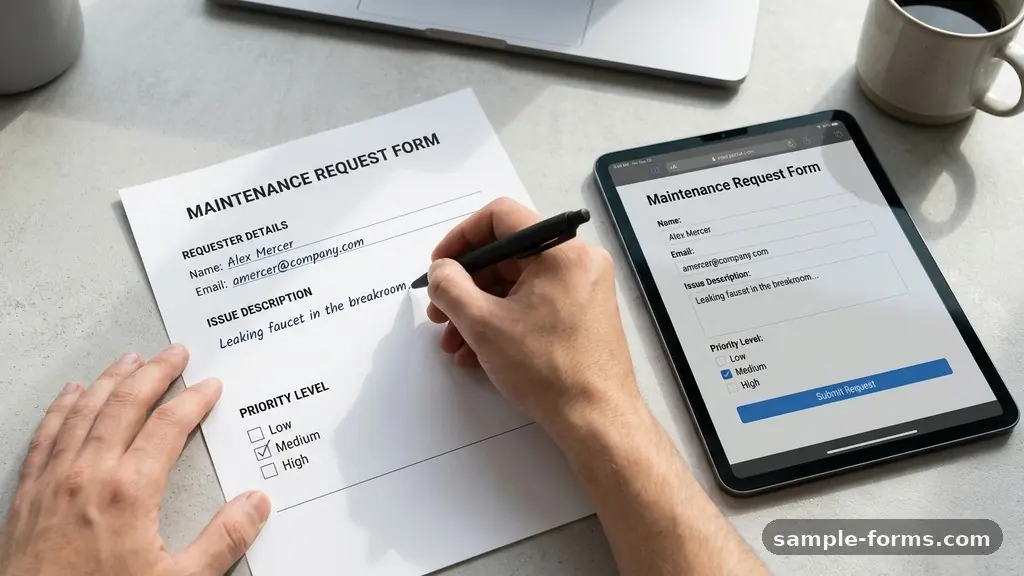
Creating a Maintenance Request Form for Buildings is the first step toward professional facility management and efficient building operations. By standardizing how you collect repair requests, you eliminate the chaos of scattered emails and sticky notes that often plague property managers.
A well-designed form ensures that your maintenance team receives all the necessary details to resolve issues quickly, improving tenant satisfaction and protecting the long-term value of your assets. This article walks you through the essential components and strategic implementation of a digital request system that saves time and money for everyone involved.
Defining the Core Elements of a Request Form
The most effective way to start creating a Maintenance Request Form for Buildings is to identify the critical data fields required for every ticket. You need to gather enough information to diagnose the problem without overwhelming the tenant with unnecessary questions.
Start with basic identification fields, such as the tenant’s name, unit number, and contact information. Including a direct phone number or email address is non-negotiable for clarifying issues or scheduling access.
Beyond contact details, the form must capture the specific nature of the repair request. A simple text box for a “Description of Issue” is essential, but adding a dropdown menu for “Category” can significantly speed up your workflow.
Categories might include plumbing, electrical, HVAC, or general carpentry. By tagging these categories early, you can route the ticket to the correct technician immediately, reducing the overall response time for the building.
Integrating Visual Evidence and Documentation
Modern property management software often allows tenants to upload photos or videos directly through a digital form. Encouraging residents to attach images of a leaking pipe or a broken window lock is a major advantage for building operations.
Visual evidence allows your maintenance staff to verify the severity of the problem before they even arrive at the site. This process helps the technician bring the right tools and replacement parts on the first visit, preventing multiple trips.
When building your form, make the file upload field prominent and easy to use on both desktop and mobile devices. Many tenants will report issues while they are standing in front of the problem, so mobile-friendliness is essential.
Ensure the form supports common file formats like JPEG, PNG, and MP4. This documentation also serves as a vital part of your maintenance log, providing a historical record of the condition of the unit over time.
Establishing Priority Levels for Repairs
Not every request carries the same level of urgency, and your form should help you categorize these needs. You can ask users to select a priority level, or you can automate this based on the category they choose.
For example, a “no heat” request in winter should be treated as an emergency, whereas a squeaky door hinge can wait for a routine schedule. Clearly defining these levels prevents your team from being pulled away from critical repairs for minor inconveniences.
| Priority Level | Description | Typical Response Time |
|---|---|---|
| Emergency | Active leaks, fire, power loss | Within 4 hours |
| High | Appliance failure, security issues | Within 24 hours |
| Routine | Cosmetic, non-urgent repairs | 3 to 5 business days |
Use the table above as a template for your own internal policy. By setting these expectations clearly in the form, you manage tenant expectations from the start.
If a tenant understands that a routine request has a specific window for completion, they are far less likely to send follow-up emails that clog your inbox. Consistency in these response times is the hallmark of a well-run facility.
The Role of Digital Forms in Asset Tracking
When you move away from paper-based systems, you gain the ability to track the lifecycle of your building’s equipment. Every submitted maintenance ticket becomes a data point in your asset tracking strategy.
If the HVAC unit in Unit 4B appears on your maintenance log five times in one year, you have concrete evidence that a replacement is more cost-effective than another repair. This data-driven approach is how professional managers shift from reactive to proactive maintenance.
Digital forms allow you to export data easily into spreadsheets or property management software. You can analyze trends by building, by floor, or even by specific equipment manufacturer.
This level of oversight is impossible when requests are buried in personal text messages or loose slips of paper. You are essentially turning every repair request into a building block for your long-term capital expenditure planning.
Optimizing the Tenant Portal Experience
A tenant portal acts as the central hub for your building operations, and the request form should be its most visible feature. When a resident logs in, they should see a clear “Submit Request” button immediately.
If the process is hidden behind multiple menus, you will find that tenants revert to calling the office or leaving notes on your desk. The goal is to make the digital path of least resistance the most attractive option for the user.
Ensure your portal is responsive and works flawlessly on a smartphone. Most tenants will interact with your building services through their phones, not a laptop.
You can find more information on the standards for accessible, user-friendly digital interfaces at the Web Accessibility Initiative. A well-integrated portal also allows tenants to see the status of their requests, which dramatically reduces the volume of “is my repair done yet?” phone calls.
Automating Communication and Workflow
Once a form is submitted, the manual work should end and the automated workflow should begin. Your system should trigger an immediate confirmation email to the tenant acknowledging receipt of their request.
This small touch provides peace of mind and proves that their concern is being taken seriously. Simultaneously, the system should send an alert to the maintenance lead or property manager to review the ticket.
Consider implementing a system where the technician updates the status of the ticket in real-time. Moving a ticket from “Submitted” to “In Progress” to “Completed” keeps the tenant informed without requiring human intervention.
This transparency builds trust and creates a professional reputation for the building management. When the tenant knows exactly what is happening, they feel more comfortable and satisfied with their living environment.
Balancing Preventative Maintenance and Repairs
While your form is designed for corrective maintenance, it can also serve as a tool for preventative maintenance scheduling. You can include a simple checkbox or a secondary form for routine inspections that tenants can schedule themselves.
If a tenant notices that a smoke detector needs a battery test or a filter needs changing, they can flag it through the same system. This proactive engagement helps catch small issues before they snowball into expensive repairs.
* Include a “permission to enter” checkbox to speed up scheduling.
* Request specific times of day that work best for the tenant.
* Add a field for alarm codes or pets to ensure technician safety.
* Use a dropdown for the specific room where the issue is located.
By encouraging tenants to participate in the maintenance of their space, you foster a sense of shared responsibility. This culture of care extends the life of your equipment and prevents the degradation of the property. Remember that a well-maintained building is a shared project between the management team and the residents.
Common Pitfalls to Avoid
When creating a Maintenance Request Form for Buildings, many managers make the mistake of asking for too much information upfront. If the form is too long, the barrier to entry becomes too high, and tenants may simply stop reporting minor issues.
Keep your form to a maximum of 10 fields and prioritize only the most essential details. You can always ask for more information later if the initial description is unclear.
Another common error is failing to test the form on different devices before launching it to the residents. A form that looks great on a 27-inch monitor might be impossible to navigate on a small phone screen.
Test the submission process yourself to ensure it is intuitive and error-free. Finally, never rely on a system that doesn’t save a copy of the submission for the sender; tenants need to know that they have a record of their request if a dispute arises later.
Frequently Asked Questions
How often should we review the maintenance request data?
You should review your maintenance log at least once a month to look for recurring issues. This allows you to identify patterns, such as a specific building wing that consistently has plumbing problems, and allocate your budget accordingly.
Should we allow anonymous maintenance requests?
It is generally better to require identification for all requests. Anonymous reports often lack the detail needed for a technician to locate the issue, and they prevent the staff from contacting the tenant to schedule access or clarify the problem.
What is the best software for managing these forms?
There are many dedicated property management platforms available today, ranging from simple form builders like Google Forms or Typeform to comprehensive enterprise software. Choose a tool that fits your building size and your budget.
How do we handle maintenance requests after business hours?
Your form should include a clear disclaimer about what constitutes an emergency. For after-hours emergencies, provide a separate phone number or a specific prompt that notifies an on-call technician immediately.
How do I get tenants to actually use the new digital form?
Consistency is key; stop accepting paper requests and politely direct any walk-ins to the digital portal. Explain the benefits to them, such as faster response times and the ability to track their request status in real-time.
Summary of Implementation
Creating a Maintenance Request Form for Buildings is a foundational step in elevating your property management standards. By focusing on simplicity, clear communication, and data-driven tracking, you transform how your team handles building operations. A digital system doesn’t just save time; it builds professional trust and ensures that your assets remain in top condition for years to come.
Start by mapping out your most common repair types and building your form around those specific needs. Once you have a clean, user-friendly process in place, you will find that both your maintenance staff and your tenants are much happier with the results. Reach out to your residents today to introduce this new, streamlined way of working together.